Review Center dashboard
Access reviews from the top navigation by selecting Reviews in the header.
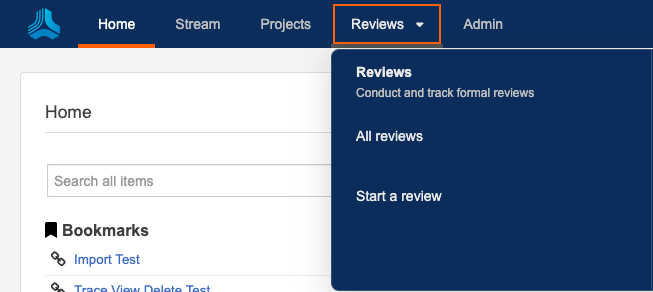
From the header, you can select:
All reviews | Opens the Reviews dashboard. |
Start a review | Launches the wizard to define and initiate your review. |
What you see in the dashboard
What is displayed in the dashboard depends on your role, whether you’ve been invited to a review, and the options you select.
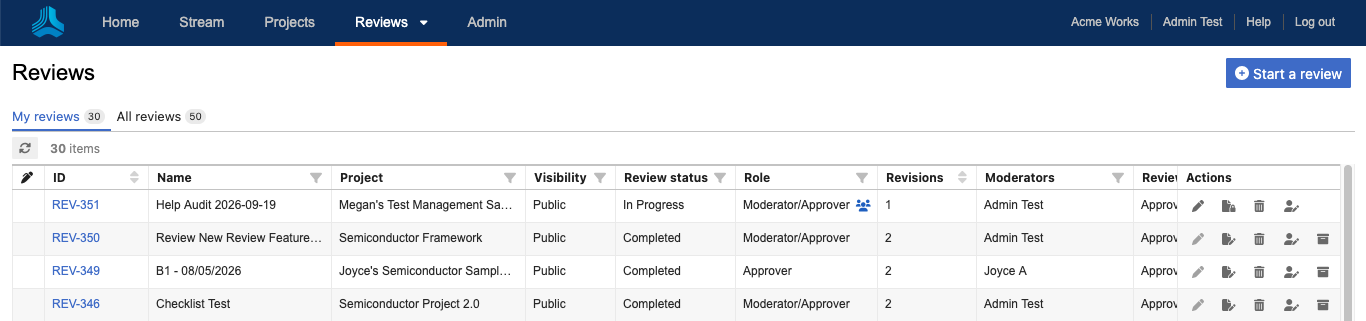
Review admins — See all reviews.
Users — See only public reviews until they are invited to a review (depends on how your organization administrator and moderator have set public review permissions).
Filter — Filter reviews by review status, your role in the review, revisions, review type, deadline, project, name, ID, and progress.
Include/Hide archived reviews — See reviews that have been archived or remove them from your results.