Configure an item type for Quality Analysis
An organization admin must configure item types to work with the add-on before it can analyze their requirements statements.
Organization Admins only
You need organization admin permissions for this task.
Important considerations
Select the item types that your team finds most useful when writing requirements statements. You can select only item types that include rich text.
You must enable the setting after you configure an item type for use with it. Then you can run an analysis on a requirements statement.
To configure an item type:
In the Jama Connect header, select ADMIN > Organization > Item types.
Select an item type from the list.
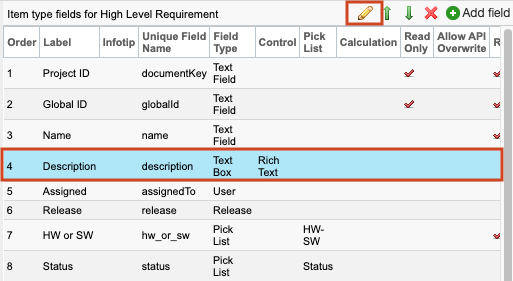
In the Item type fields panel, select a row that includes Rich Text in the Control column (for example, Description), then select the pencil icon to edit it.
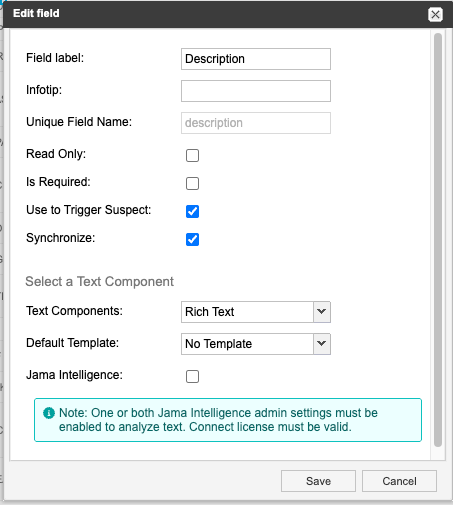
In the Edit field window, complete the fields and select options as needed, then select Jama Intelligence and select Save.
The item type is now configured. Once enabled, users can use it to analyze requirements statements for the item type you configured.