Widget toolbar
The widget toolbar appears in Single Item View.
The widgets give you access to different features of Jama Connect and can be configured by an organization admin.
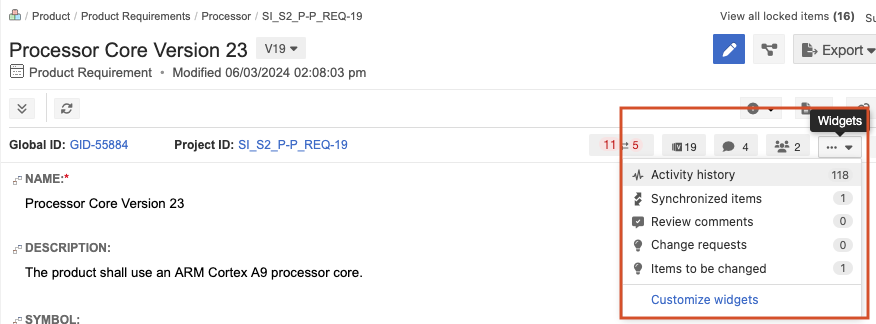
From the Widgets drop-down menu, select Customize widgets to choose which widgets appear in the toolbar.
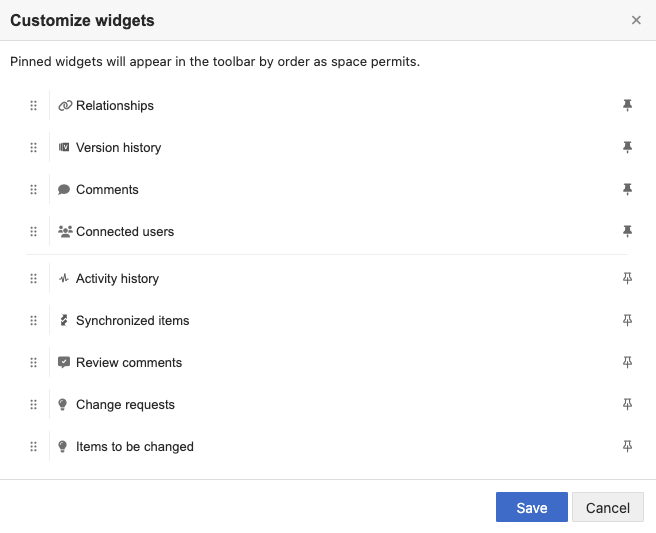
Select this... | To... |
|---|---|
Relationship Status Indicator | Opens a panel where you can see the required relationships for this item and whether the item follows the project's relationship rules. Suspect relationships are also flagged. |
Connected users | Open a window that displays the users directly associated with the item as well as indirectly associated with related or traced items. The number displayed is the number of connected users. |
Review comments | Open a panel of review comments related to this item. The number displayed is the total number of comments for this item. |
Comments | Open a panel of comments related to this item. The number displayed is the total number of comments for this item. |
Activity history | Open a panel of activities related to this item. |
Version history | Open a panel of item versions. The number displayed is the total number of versions for this item. |
Synchronized items | Open a panel of synchronized items. |
Child items | Open a panel with a list child items. Appears only if the selected item has child items. |
Change requests | Open a panel with a list of change requests that might affect this item. |
Items to be changed | Open a panel with a list of change requests containing this item. |